 alt Hacker News
Show HN: I built a macOS tool for network engineers – it's called NetViews
Hi HN — I’m the developer of NetViews, a macOS utility I built because I wanted better visibility into what was actually happening on my wired and wireless networks.
I live in the CLI, but for discovery and ongoing monitoring, I kept bouncing between tools, terminals, and mental context switches. I wanted something faster and more visual, without losing technical depth — so I built a GUI that brings my favorite diagnostics together in one place.
About three months ago, I shared an early version here and got a ton of great feedback. I listened: a new name (it was PingStalker), a longer trial, and a lot of new features. Today I’m excited to share NetViews 2.3.
NetViews started because I wanted to know if something on the network was scanning my machine. Once I had that, I wanted quick access to core details—external IP, Wi-Fi data, and local topology. Then I wanted more: fast, reliable scans using ARP tables and ICMP.
As a Wi-Fi engineer, I couldn’t stop there. I kept adding ways to surface what’s actually going on behind the scenes.
Discovery & Scanning: * ARP, ICMP, mDNS, and DNS discovery to enumerate every device on your subnet (IP, MAC, vendor, open ports). * Fast scans using ARP tables first, then ICMP, to avoid the usual “nmap wait”.
Wireless Visibility: * Detailed Wi-Fi connection performance and signal data. * Visual and audible tools to quickly locate the access point you’re associated with.
Monitoring & Timelines: * Connection and ping timelines over 1, 2, 4, or 8 hours. * Continuous “live ping” monitoring to visualize latency spikes, packet loss, and reconnects.
Low-level Traffic (but only what matters): * Live capture of DHCP, ARP, 802.1X, LLDP/CDP, ICMP, and off-subnet chatter. * mDNS decoded into human-readable output (this took months of deep dives).
Under the hood, it’s written in Swift. It uses low-level BSD sockets for ICMP and ARP, Apple’s Network framework for interface enumeration, and selectively wraps existing command-line tools where they’re still the best option. The focus has been on speed and low overhead.
I’d love feedback from anyone who builds or uses network diagnostic tools: - Does this fill a gap you’ve personally hit on macOS? - Are there better approaches to scan speed or event visualization that you’ve used? - What diagnostics do you still find yourself dropping to the CLI for?
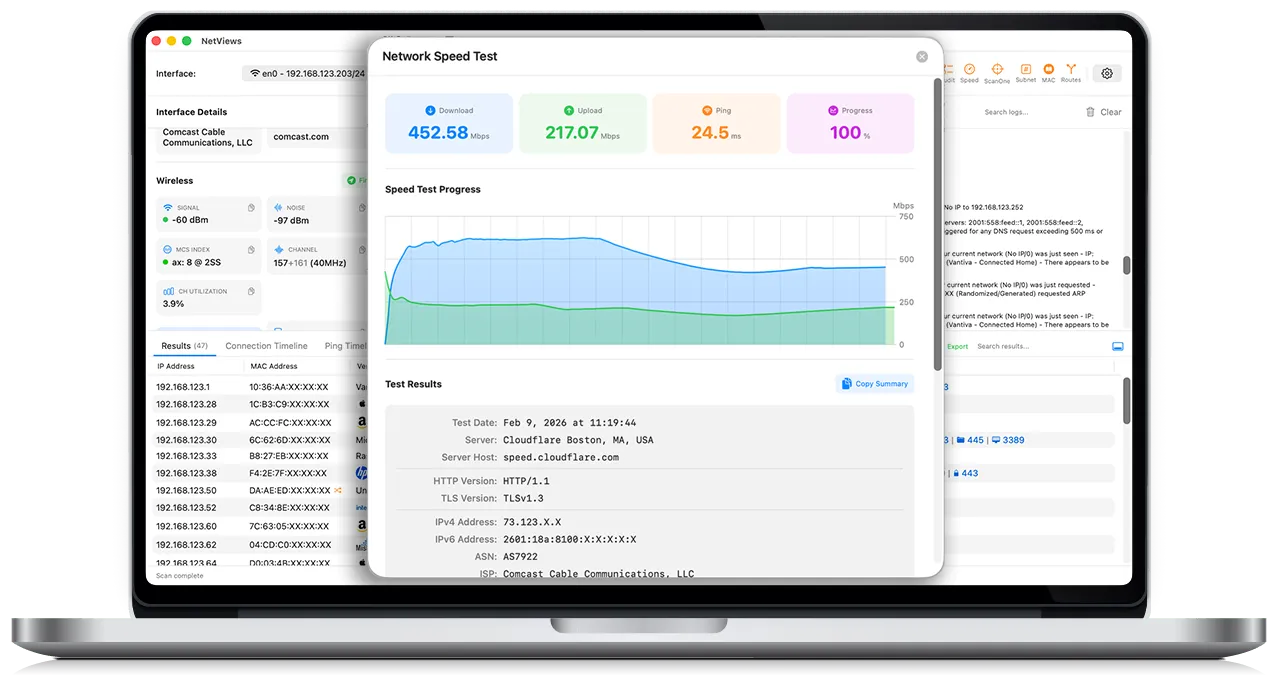
Details and screenshots: https://netviews.app There’s a free trial and paid licenses; I’m funding development directly rather than ads or subscriptions. Licenses include free upgrades.
Happy to answer any technical questions about the implementation, Swift APIs, or macOS permission model.
Comments
Congratulations on shipping! Looks awesome.
Minor bug: I tried opening the WebP screen shots in another tab so I could zoom and see them more clearly, and it does not work. Chrome renders the WebP image data as text, and Safari prompts you to download it. This appears to be because the web server is not returning a `Content-Type` header for these URLs:
curl --head https://www.netviews.app/_astro/ss7.D8bYvHF6_1awjYx.webp
EDIT: Fixed! I see a Content-Type header now
Looks very neat.
Have you considered offering it through the App Store? I would pay a modestly higher price for that. Or for open source.
But the combination of closed source and not being on the App Store is a bit of a dealbreaker for me.
I talked to you last month when you posted this. I did end up buying a copy, and it has been somewhat useful.
Three things, it drives me nuts when it migates to the localhost interface, but doesn't migrate back. Either, we need to lock to an interface, or just have the option to remove one.
Two, constantly bouncing in the dock is incredibly annoying and distracting. We don't need more distractions, we need less.
Three, showing the wifi mesh info has actually proven to help, but it would really be even more helpful if you could expand that to rates and more wifi protocols.
Looks great I don't have a nees for it, but I'm also happy to see more specialized tools being built natively for macOS, despite Apple's poor releases lately. I have no plans to use anything but a mac in the near future, and normally am happy to pay for a well-crafted mac first app.
Did you use or have any problems with SwiftUI that you found workarounds for? It's been a while since I've played with it, but last I checked it was a bit underperforming and opaque
If I may offer a marketing suggestion - make it easy for people to do a “proam” workflow to setup their own network. A “one click to diagnose and visualize your Wi-Fi setup”. And then write content around that.
This tool looks more powerful than what I would use, but if there were a kid version, I’d like someone to tell me how to improve my network performance.
Looks useful and I like the UI, it reminds me of UniFi. After a few minutes I had to force-quit and sent a report. I will buy it, I love messing about and have a reasonably complex home network and have been getting by with a mix of Unix and homemade tools; this is nicer.
The info on your About page
>NetViews is a modern, macOS network scanning app inspired by the specialized needs of IT, engineering, and network professionals. It combines host discovery, port scanning, real-time monitoring, and vendor/DNS insights with a clean, native interface - giving you the tools you need without the complexity you don't.
Should be right on the front page above the fold.
Great job, I will give it a try. As I'm more interested for personal use, can it help me find the best WiFi channel to use for my network, as I live in a dense populated area?
Looks great. I bought a license just so I'm sure I've got it next time I'm debugging a network issue.
I downloaded, tried to try but I got "You've already used your 7-day trial on this Mac."
Is it possible to buy the standard version and upgrade to the pro later for the difference between the two pricing tiers ($30)?
Looks nice. MacOS has needed something like this for quite a while.
This looks so pretty and awesome :)
My first thought, as a network engineer, is that I already have access to pretty much every feature of this tool from the CLI. You ask if I would give that up for this app, and the answer is "not unless you integrate all the other CLI tools I use as features". Obviously, that's not reasonable, because my needs (like most engineers) are overly specific. You could never please everyone.
If this were an iPad/iPhone app, I would say that you nailed it, because this would be way easier and more complete than any of the tooling I have available on a mobile device right now. Otherwise, all of my other tooling is in the CLI, so I would ultimately be going out of my way to use this tool on my Mac.
The easiest fix I can think of is to open the door to third-party/community extensions so that people can add their own tooling to the app. You mention that this is largely a bunch of CLI wrappers, so it would be very helpful if we could write our own, and maybe even share them with each other.
[dead]
[dead]
It looks very slick!
Cool to see more network tools for macOS.
For anyone who does prefer a CLI-based approach, I maintain RustNet https://github.com/domcyrus/rustnet which is open source and cross-platform (Linux, macOS, Windows) with real-time connection monitoring, deep packet inspection, process identification, and a terminal UI. Obviously a different kind of tool than a polished GUI app like this, but if you live in the terminal or want something you can script and automate, it might be worth a look.
On the macOS network tools side, have you looked into PKTAP? I use it in RustNet to get process-level attribution for network connections. Might be worth exploring if you want to tie traffic back to specific processes.