 alt Hacker News
Bring Back Idiomatic Design (2023)
Comments
Most software is not designed by intelligent and thoughtful people anymore. It is designed by hastily promoted middle manager PM/Product type people who, as has been mentioned elsewhere, simply were not around when thoughtful human interface design was borderline mandatory for efficiency’s sake.
There is incompetence and there is also malevolence in the encouragement of dark patterns by the revenue side of the business.
As the author identifies, the idioms come from the use of system frameworks that steer you towards idiomatic implementations.
The system UI frameworks are tremendously detailed and handle so many corner cases you'd never think of. They allow you to graduate into being a power user over time.
Windows has Win32, and it was easier to use its controls than rolling your own custom ones. (Shame they left the UI side of win32 to rot)
macOS has AppKit, which enforces a ton. You can't change the height of a native button, for example.
iOS has UIKit, similar deal.
The web has nothing. You gotta roll your own, and it'll be half-baked at best. And since building for modern desktop platforms is horrible, the framework-less web is being used there too.
> There are hundreds of ways that different websites ask you to pick dates
Ugh, date pickers. So many of these violently throw up when I try to do the obvious thing: type in the damn date. Instead they force me to click through their inane menu, as if the designer wanted to force me into a showcase of their work. Let your power users type. Just call your user’s attention back to the field if they accidentally typed 03/142/026.
Thank you so much for writing this. I'm also from the desktop era and I can't STAND all the reinvention going on, or the fact that I have to move the mouse all over the screen or randomly stab my phone with my finger to find out what I can interact with.
I'm working on a GUI app and a web app in concert right now. They work in the same niche, but at different levels (one is desktop-level management, the other is enterprise-level management). I stepped back and developed a unified design language (Tela Design Language, or TDL) which has saved my sanity and made the apps actually usable again.
https://parkscomputing.com/content/tdl-reference.html
https://github.com/paulmooreparks/tela/blob/main/TELA-DESIGN...
UX has really gone downhill. This is particularly true of banking websites.
Also, the trend of hiding scrollbars, huge wasted spaces, making buttons look really flat, confusing icons, confusing ways of using drop downs rather than using the select/option html controls etc have all made the whole experience far inferior to where desktop UI was even decades ago
> Prefer words to icons. Use only icons that are universally understood.
Underrated. Except for dyslexic people, and the most obvious icon forms, I am pretty sure most people are just better and faster at recognising single words at a glance than icons.
> Every single button is clearly visually a button and says exactly what it does. And each one has a little underline to indicate its keyboard shortcut. Isn’t that nice?
Something not mentioned here (that came from the Mac world as I understand it): everywhere that the text ends with an ellipsis, choosing that action will lead to further UI prompts. The actions not written this way can complete immediately when you click the button, as they already have enough information.
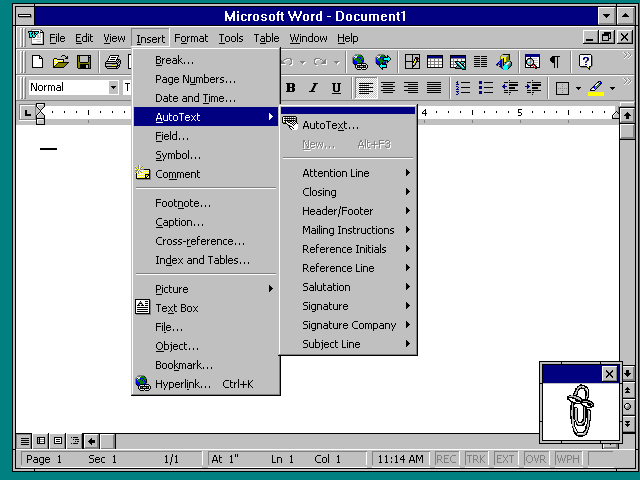
It's a little interesting that they would pick Office 2000 as an example, since Office 97 and onwards do not use standard OS widgets -- it reimplements and draws them itself*.
The menu bar in Office 2000 does not look like the standard OS menu bar, for instance. The colors, icons and spacing are non-standard. This is only slightly jarring, because it's pretty well done, but it's still inconsistent with every other app.
This was kind of the beginning of the end for Windows consistency -- when even Microsoft thought that their own toolkit and UX standards were insufficient for their flagship application. Things have only become worse since then.
* This becomes very obvious when you run Office 97 on NT 3.51, which generally looks like Windows 3.1, but since Office 97 renders itself and does not care about OS widgets, it looks like this: http://toastytech.com/guis/nt351word.png
Interesting that Apple is praised.
> that a link? Maybe!
When Apple transitioned from skeuomorphic to flat design this was a huge issue. It was difficult to determine what was a button on iOS and whether you tapped it (and the removal of loading gifs across platforms further aggravated problems like double submits).
Another absurdity with iOS is the number of ways you can gesture. It started simply, now it is complex to the point where the OS can confuse one gesture for another.
Lately I've occasionally been running into round check boxes that look like radio buttons. Why????
button is clearly visually a button
I had the pleasure of using a web app a few years ago that somehow managed to have buttons that looked like buttons, buttons that looked like static text, static text that looked like static text, and static text that looked like buttons, all on the same page. It was very memorable and extremely confusing to use.
    Checkboxes are square,
    Radiobuttons are round,
    Beware those who dare
To switch them aroundWe've lost some common features:
* Undo & redo
* Help files & context sensitive F1
* Hints on mouse hover
* Keyboard shortcuts & shortcut customisation
* Main menus
* Files & directories
* ESC to close/back
* Drag n drop
Revelation features when they first became common. Now mostly gone on mobile and websites.
Yall remember https://en.wikipedia.org/wiki/Mystery_meat_navigation? Back in 2004-ish era, there was an explosion of very creative interaction methods due to flash and browser performance improvements, and general hardware improvements which led to "mystery meat navigation" and the community's pushback.
Since then, the "idiomatic design" seems to have been completely lost.
At some point UX became a synonym of manipulating users into doing things, and I wonder if it can ever go back.
It might have started in an innocent way, all those A/B tests about call-to-action button color, etc. But it became a full scale race between products and product managers (Whose landing page is best at converting users?, etc.) and somewhere in this race we just lost the sense of why UX exists. Product success is measured in conversion rates, net promoter score, bounce rates, etc. (all pretty much short-term metrics, by the way), and are optimized with disregard to the end-user experience. I mean, what was originally meant by UX. It is now completely turned on its head.
Like I said, I wonder if there is way back of if we are stuck in the rat race. The question is how to quit it.
Much of this is foisted upon us by visual designers who wandered into product design. It's a category error the profession has never quite corrected. (maybe more controversially, it's caused by having anyone with the word "designer" in their title on a project that doesn't need such a person - this category is larger than anyone thinks)
Guys, I found out about this technology called Cascading Style Sheets recently and I think it's the missing piece we've been looking for. It lets you declaratively specify layout in a composable, hierarchical system based on something called the Document Object Model in a way that minimizes both clientside and serverside processing, based on these things called "stylesheets".
The best part is, it's super easy to customize them, read others for inspiration or to see how they did something, or even ship multiple per site to deal with different user preferences. Through this "forms" api, and little-known browser features like url-fragments, target/attribute selector, and style combinators, plus "the checkbox hack" you can build extremely responsive UIs out of it by "cascading" UI updates through your site! When do you think they're going to add it to next.js?
I'm tentatively calling this new UI paradigm "no-framework" or "no package manager", not sure yet https://i.imgur.com/OEMPJA8.png

One trend that I can’t stand currently is the obsession with keyboard shortcuts everywhere even to the point of overriding browser defaults. Cmd+F focusing on the site’s search input instead of letting me search in the page with the browser’s search functionality (looking at you github and Linear).
I generally don’t need any fancy keyboard shortcuts on a website. I have a mouse, I can just click around.
The number of JavaScript dropdown replacements that don't work correctly with the keyboard is stunning. It always amazes me how many forms fail at this basic usability aspect. The browser has homogeneous form controls built in, just use them!
designers are creatives and will always believe the visual elements of a design need to be updated, refreshed, modernized etc.. then we get flavour of the month nand new trends in visual language and ui design that things must be updated to.
As soon as UI design became a creative visual thing rather than a functional thing , everything started to go crazy in UI land..
I had to laugh when I read this:
> Avoid JavaScript reimplementations of HTML basics, e.g. React Button components instead of styled <button> elements.
I've been hearing that for the entire Internet era yet people continue to reinvent scrollbars, text boxes, buttons, checkboxes and, well, every input element. And I don't know why.
What this article is really talking about is conventions not idioms (IMHO). You see a button and you know how it works. A standard button will behave in predictable ways across devices and support accessibility and not require loading third-party JS libraries.
Also:
> Notwithstanding that, there are fashion cycles in visual design. We had skeuomorphic design in the late 2000s and early 2010s, material design in the mid 2010s, those colorful 2D vector illustrations in the late 2010s, etc.
I'm glad the author brought this up. Flat design (often called "material design" as it is here) has usability issues and this has been discussed a lot eg [1].
The concept here is called affordances [2], which is where the presentation of a UI element suggests how it's used, like being pressed or grabbed or dragged. Flat design and other kinds of minimalism tend to hide affordances.
It seems like this is a fundamental flaw in human nature that crops up everywhere: people feel like they have to do something different because it's different, not because it's better. It's almost like people have this need to make their mark. I see this all the time in game sequels that ruin what was liked by the original, like they're trying to keep it "fresh".
I’m not sure the core thesis is correct for two reasons. I’ve been around the block a few times now and I don’t think I’ve ever lived in an era where people were like “the current state of design is awesome”. There are always rose-tinted think pieces with some dubious stats about how things are awesome in the past.
Secondly, idiomatic is good if it matches your mental model. However, what does idiomatic mean in the context of billions of people coming from various computing starting point. Just as a simple thought exercise, how do you design idiomatically for people who are most familiar with Windows era computers and people who start with touchscreens, both generations who are still alive today?
I reference Jakob's Law at least once a week, which says users use not your site most of the time. So if it works like most other sites then users will intuitively understand it. And if you do something different users will struggle to learn it.
> The visuals feel a little ugly and dated: it’s blocky, the font isn’t great, and the colors are dull.
I don't get this at all. I find the screenshot clear and beautiful if anything.
My hope is that since tools like Google Stitch have made fancy looking design free that it will become obvious how functionally worthless fancy looking design always was. It used to signal that a site paid a lot of money and was therefore legitimate. Now it signals nothing.
The solution to this kind of problem is standards.
For most of the history of computation, things were moving too fast for anyone to really worry about standardization. Computing environments were also somewhat Balkanized. Standard keyboard shortcuts, for just one example, weren't. They still aren't. e.g. If you fingers are accustomed to hitting Ctrl-C to copy on most computers, they'll hit Fn-C on a Apple keyboard, which isn't Copy.
Today, things are moving slower and web interfaces have largely taken over. Your choice of OS mostly just affects how you get into a browser or some other cross-platform program... and what keys you hit for Copy and Paste.
Now would be a reasonable point in the history of computation for us to seriously consider standards. I'm not talking about licenses, inspectors, and litigation if you get it wrong. I'm just talking about some organization publishing standards that say, "This is how you build a standard login form. These are the features it should have. This is how they should be laid out. These are the icons to use or not use. These are the what keyboard shortcuts should be implemented." The idea is that people who sit down and start building a common bit of interface, instead of picking and choosing others to copy, should have a clear and simple set of standards to follow.
And yes, Apple needs to fix their #$%@ing keyboards.
> You can enter ALT+F to open the File menu, then hit N
Some developers raised on Macs don't understand the need for this behaviour in the Windows version of their software. Most do, but it's frustrating when the windows version of a multi platform framework doesn't afford for this.
Also the arrival of windows 8 which put controls and buttons at top and bottom of the screen was a big step backwards in consistency. Mobile interfaces (Android) still do this and it slows down interactions.
There are too many issues with those designs of the old, so instead of going regressing into them let’s instead progress towards the fantasy of universal user-centric configuration!
Who do I need 50 different “save” icons in different apps when I could set just one and have instant “idiomatic” recognition anywhere? I could even ditch the text because it’s one of the top 10 commonly used icons that require no text. Oh, and the web apps would also use it in their menus… Or not, I never need this icon in the first place since I always use a shortcut, so one config change, and now not a single app has the icon!
Can I have “Close” menu use X as an accelerator shortcut everywhere instead of C, and let it work on Windows and Mac and Linux?
Can I not waste the most ergonomic thumb modifier key Alt to open menus I rarely use? And if I waste it, can I also have it working on a Mac, where it would have the same physical position, ie, Cmd?
> You don’t want to have to remember to use CTRL + Shift + C in certain circumstances or right-click → copy in others, that’d be annoying.
laughs in linux wouldn’t that be nice.
> Suppose you’re logging into a website, and it asks: “do you want to stay logged in?”
Then the website has made its first mistake, and should delete that checkbox entirely, because the correct answer is always "yes". If you don't want to be logged in, either hit the logout button, or use private browsing. It is not the responsibility of individual websites to deal with this.
>using GMail is nothing like using GSuites is nothing like using Google Docs
G Suite (no s) was the old name for Google Workspace. Google Workspace includes GMail, Google Docs, Google Sheets, Google Calendar, etc., so it doesn't really make sense to say that Google Workspace has a different UX than Google Docs, if Google Docs is part of Google Workspace.
Disclosure: I work at Google, but not one of the listed products.
Are mobile native apps "idiomatic" then? Speaking of uis made with native frameworks of a specific platform. They surely share some patterns, especially on navigation, top bar, button bar, etc but it's been the death of design and ux. You can't use any app with one hand alone, everything is flat. I share the sentiment that some basic elements should behave the same, like inputs, but I miss the day where we experimented with uis, especially with early internet and flash. Sure many of these looked bad and were horrible to use, but in some ways each one had some character. We basically stopped doing any ui innovation on both the web and native desktop/mobile platforms and that's sad to me
The examples chosen are particularly interesting to me.
In particular Microsoft Word 2000 was panned at the time for not following native conventions. Its inputs, buttons, and File/Edit menus actually do not match the underlying OS.
Do developers who came from Photoshop or Fireworks days actually like Figma? Maybe it's just down to how our designers are using it but I find pawing around a giant 2 dimensional document awkward as hell versus just opening a well named PSD in a folder.
> Study and follow HTML/CSS idioms whenever possible. For example, a link should be underlined, colorful, pointer on mouseover, and written as an <a> tag.
Moreover, if you change the color, you should also change the color of visited links, otherwise they will be the same color. And ideally, you should use a shade of blue for links, and purple for visited links.
One of my pet peeves is that increasingly frequently, pressing Enter to submit a web form doesn’t even universally work anymore. Instead you have to tab to the submit button, and (depending on the web page) have to press Space or Enter to actuate it.
Another annoyance is that many web forms (and desktop apps based on web tech) don’t automatically place the keyboard focus in an input field anymore when first displayed. This is also an antipattern on mobile, that even on screens that only have one or two text inputs, and where the previous action clearly expressed that you want to perform a step that requires entering something, you first have to tap on the input field for the keyboard to appear, so that you can start entering the requested information.
A few of my favorites:
- "Not-Boxes": Negatively formulated text (disable... / don't...)
- "Button-Checkboxes": Checkboxes with verbs that trigger actions
- "Radio-Checkboxes": Radios that are actually checkboxes (not mutually exclusive)
- "Toggle-Checkboxes": Checkboxes that are actually toggle buttons and can't decided wheter the text should show the current state or the state that will happen when you click.
The behavior science also changed a lot of things. People study behavior, patterns, what can sell more, what looks more intuitive. If something looks a bit different from the others, it will sell better. If something look the same way as the previous one, why should the client buy it? The client needs to see a difference, it can be only a little bit more flashy, but it must be different. 20 years, later, this is the result.
Especially now, in the AI era, where each person can make a relatively working app from the sofa, without any knowledge of UI/UX principles.
That windows 2000/win 95 interface was peak windows design.
UIs are inconsistent even in the same app. Nevermind plugins or suites. It would be great if menus were customizable so you could plug in your own template.
This kinda hurt. The world is in a rush to be the ASAP, so nobodys interest is to do design good, it needs to be fast. And now we have this sh*tshow.
And while we're at it, stop with the popups and notifications.
I don't care about the new features in a browser update. Ideally, nothing at all has changed.
I don't want a "tour" of the software I just installed. I, presumably, installed it to do something, and I just want to do that thing.
I don't want to have to select a preference for how a specific action is performed in your software. If it's not what I expected, I will learn it.
And for the love of GOD, nobody wants to subscribe to your newsletter.
But I'm not convinced the old consistency was purely a design victory... it was also a result of heavy constraints
The web needs a HIG.
All of these people who keep saying that webapps can replace desktop applications were simply never desktop power users. They don’t know what they don’t know.
With some irony, one thing Substack doesn't afford is zooming in to images on mobile.
My health provider recently changed their homepage UI to have a human 'profile' icon to mean "register", a lock icon to sign-in, and 'box-arrow-in-right" to logout. No tooltips
Shows a picture of Office 2000 and says "The visuals feel a little ugly and dated: it’s blocky, the font isn’t great, and the colors are dull."
Are you serious? Nothing has come close to it. Yeah we have higher resolution screens, but everything else is much less legible and accessible than that screenshot.
In the Windows 2000 era, you didn't need a product tour or a tooltip onboarding flow because the UI was self-documenting. If a feature existed, it was in the menu bar. If a shortcut existed, it was underlined.
Today, we’ve replaced functional density with clean whitespace. We hide essential features under hamburger menus and invisible long-presses to make the UI look good in a Dribbble shot, then we wonder why we have to spend millions on UX research to see if users can find the Settings button.
We’ve moved from User Interfaces to User Puzzles. We’re essentially forcing every user to learn a new language for every single app they open. It’s a massive, collective drain on global productivity, all for the sake of brand identity.
This is a feature, not a bug. By making your software different you make it harder for people to switch.
In text boxes in some applications, enter submits the entered text, and ctrl-enter forces a newline (not at my computer, but I think Slack does this). In others, it's the other way around (pretty sure GitHub does this for comments).
I don't know how we got here and I don't know how to fix it, but "bring back idiomatic design" doesn't help when we don't have enough idioms. I'm not even sure if those two behaviors are wrong to be inconsistent: you're probably more likely to want fancier formatting in a PR review comment than a chat message. But as a user, it's frustrating to have to keep track of which is which.